
Samsung MUF-256DA Broken Connector
A customer dropped off a Samsung 256GB USB 3.1 Flash Drive — model MUF-256DA/AM, the small “Fit Plus” style drive designed to sit nearly flush in a USB port — with a complaint we get every week: it stopped being recognized after getting bumped while plugged in. The drive held a mix of personal files the customer wanted back, with no backup.
A quick look under the microscope told us the whole story.
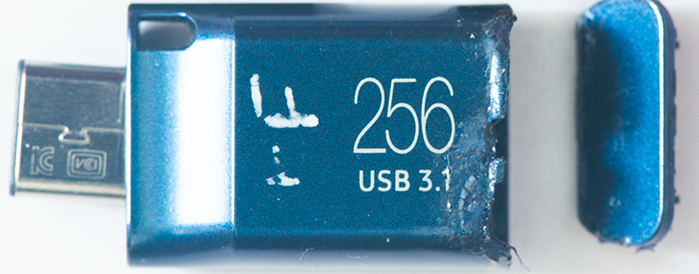
The Damage: Bent Connector and Torn Pads
The USB-A connector was visibly bent. Worse, when we worked it gently with tweezers, it was loose — only partially attached to the board. When we removed it for inspection, the picture got worse: several of the solder pads on the PCB had lifted entirely, ripped off the board along with the connector. The copper landing zones where the connector pins were supposed to make contact were simply gone.
This is the failure mode you get when a low-profile drive takes a lateral hit while plugged in. The connector acts like a lever. The pads — small rectangles of copper bonded to the PCB substrate with adhesive — can only take so much shear force before they let go. Once they lift, no amount of resoldering the original connector will help. There’s nothing left to solder to.
A lot of recovery shops will quote “unrecoverable” at this point, or push the customer toward an expensive chip-off attempt. Neither is necessary. With patience and the right technique, the board itself can be repaired.
The Drive: Samsung MUF-256DA/AM
A quick word on this particular drive, because it matters for the recovery approach. The Samsung Fit Plus line uses a monolithic-style construction — the controller and NAND flash are integrated into a single package mounted on a tiny PCB, with the USB connector as a separate piece soldered to one end. There is no discrete NAND chip we could desolder and read on a programmer. If we couldn’t repair the board, the only path forward would have been finding the test pads on the monolithic package itself and reading the NAND directly through them — slower and more invasive than a board-level repair.
So board-level repair was the right first move. Get the connector working again, get the drive enumerating on USB, and image it normally.
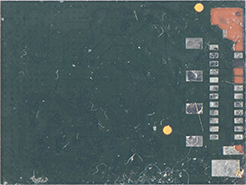
The Repair: Pad Reconstruction and Jumper Wires
When solder pads tear off a PCB, you don’t really repair the original pads — they’re physically gone. What you do is trace where each missing pad’s signal goes, find the next viable connection point along that trace, and bridge the connector pin directly to that point with a fine jumper wire. The connector ends up sitting in roughly the right position, but mechanically and electrically it’s been re-engineered.
Our process for a job like this:
1. Document what’s left. Under the microscope we map every surviving trace and identify which pads are gone. We compare against an intact reference — either another board of the same model or schematics we’ve built up internally — to confirm which pin needs to go where.
2. Clean the damage. Lifted pad fragments, torn solder mask, and any residual adhesive have to come off. We use a fiberglass scratch brush and isopropyl alcohol to get back to clean copper or clean substrate everywhere we plan to work.
3. Expose viable copper. Where the original pad is gone, we find the trace running underneath the solder mask further back from the connector edge. A careful scrape with a sharp blade exposes a small section of bare copper that we can solder to.
4. Run jumper wires. We use 38–40 AWG enameled wire — fine enough to route precisely, robust enough to survive handling. Each jumper goes from the exposed trace to a small piece of copper foil or solder bump that will serve as the connector’s new landing pad. Clean, low-profile joints are essential — there’s no room for blobs on a board this small.
5. Reattach the connector. Once the new landing pads are in place, the cleaned-up connector (or a known-good donor) gets soldered down onto them. We add a small amount of epoxy under the connector body for mechanical strain relief — without it, any future flex would tear our jumpers right out.
6. Continuity test before powering up. Every pin gets verified against the matching point on the board with a multimeter. We also check for shorts between adjacent pins — a single solder bridge across the data lines would prevent enumeration. Only after the board passes a clean continuity check do we plug it in.
Reading the Drive and Recovering the Data
With the repair complete, the Samsung enumerated on USB the moment we plugged it in. The controller responded normally, the drive reported its full 256GB capacity, and the existing filesystem mounted without issue.
We always image first and recover second. The drive went onto a write-blocker and we pulled a complete sector-level image to a recovery workstation. From the image, we extracted the customer’s files: family photos, video clips, scanned documents, music, and a handful of project folders — the kind of mixed personal data that’s irreplaceable when there’s no backup. Every file came back intact.
The customer had everything back within two days of dropping the drive off.
What This Case Illustrates
A broken or wiggling USB connector almost never means the data is gone. Even when the pads tear off the PCB along with the connector, the underlying NAND is untouched — it has no idea anything happened. The challenge is purely electrical: getting a clean, reliable connection back between the USB host and the drive’s controller.
A few things worth knowing if you’re in this situation:
- Stop using the drive immediately. Repeatedly trying to plug in a damaged connector can short pins together, draw current through the wrong paths, and in the worst case damage the controller or NAND. Once the failure happens, leave it alone.
- Do not attempt a DIY solder repair. Standard soldering irons and consumer solder are too coarse for boards this small. The first attempt usually destroys the remaining pads and makes professional recovery harder.
- Skip the format prompt. If a damaged drive does enumerate intermittently and Windows asks to format it, do not click yes. Reformatting wipes the controller’s mapping tables and turns a straightforward recovery into a far more involved one.
- Beware of “no recovery, no fee” shops that decline monolithic drives. Many recovery services advertise that policy but quietly exclude any case that requires component-level board work or monolithic chip access. Make sure your shop actually does this work in-house.
We handle Samsung Fit, Fit Plus, Bar Plus, and other monolithic-style USB drives every week — along with broken connectors on every other major brand. If you have a flash drive that’s stopped working after physical damage, bring it in. We’ll tell you exactly what’s wrong and what it’ll cost before you commit to anything.
