How Flash Drives Fail


January 18, 2009 by Jeremy Brock

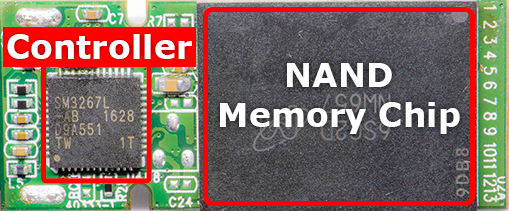
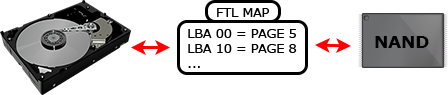
Flash devices such as memory cards (CF, SD, XD, etc) and USB flash drives are very robust but they do fail. Drives fail 90 percent of the time because of corruption in the lookup tables which convert logical addresses (what your computer sees) to physical addresses (what the controller sees). The remaining 10% is split between controller failures, power surges, and worn or broken solder joints.

Flash Drive Recovery Unrecognized Table

NAND memory has many quarks.

  • Each block is only good for a finite number of writes after which bit errors occur, for example the word “flash” may become “slash”.
  • Data can be read in pages (2K bytes) but must be written in blocks (128K bytes).
  • Before a write can occur the block must be erased, if power is lost before a write completes the sector remains erased.

Lookup Tables

Each word (two bytes) contains the block number which holds that sectors data. For example 0x001A is the block number for sector 0, 0x0419 is the block number for sector 1, etc. If the block numbers are incorrect the controller won't know where the actual data is stored. In this example some of the block numbers are incorrect because of bit errors caused by an aging NAND chip. Some controllers may automatically detect the error and prevent further writes. In this case the user may get an error message asking them to format the drive.

Flash Drive Recovery Unrecognized

In this example the flash drive was unplugged before a write operation on the lookup table completed leaving the table filled with 0xFFFF from the erase cycle. The user may be prompted to insert removable media, the drive may be displayed as 0MB in size, if the drive is listed it may be shown as an unknown device.

Flash Drive Recovery Unrecognized / Broken

We are able to recover data your data by removing the NAND memory chip and reading it externally. Visit our USB Flash Drive Recovery page for more information.

Aging NAND Memory

Flash Drive Data Recovery Bit ErrorsAs NAND memory ages bits inside a block can become stuck, newer high density MLC chips are plagued by this problem. To combat this controller manufactures use ECC (Error Correcting Code) to fix a limited number of bit errors. Once the number of correctable bits per sector is exceeded flash drives may act strangely for example frequent file system corruption may occur or the drive will stop working. In these cases I’ll often see color shift in pictures, half the image will be normal and the other half will be a different tint. This is because part of the image was stored in a good block while the other part was in a bad block with sticky bits.

Weak Solder Joints

Wear and tear on the drive can cause solder joints on the NAND memory chip or controller to weaken. If the drive is recognized the total capacity will only be a few megabytes. If you connect the drive while applying LIGHT PRESSURE to the controller and NAND memory you may be able to retrieve the data. Remember, weak solder joints account for LESS THAN 10% of failures. DON’T APPLY MORE PRESSURE if this doesn’t work, you may damage the NAND memory chip if you press too hard.

Broken Flash Drive Recovery

If you can’t retrieve your data with this method you will need to send the drive to a data recovery shop that specializes in retrieving data from logically damaged USB flash drives.

Hacked USB Flash Drives

Some unbranded or counterfeit flash drives are hacked to display the wrong drive size using the manufactures mass production tool and then sold as larger capacity drives. For example a flash drive with a 4GB NAND chip will report itself as 8GB drive. These drives often work until the user starts to fill the drive with data after which it becomes unreadable. These fake flash drives are usually sourced from china and sold on eBay. If your data is NOT important you can download the mass production tool for the drives controller and reformat the drive using the correct capacity. You can find manufacture production utilities on flashboot.ru
Broken USB Connector

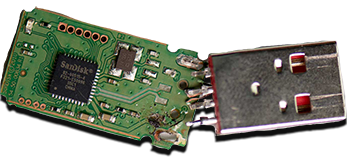
If the USB connector was broken off the USB Flash drive you can recover the data by repairing the trace using a conductive pen.

Broken USB Flash Drive Recovery

  1. Use a set of tweezers to place whats left of the trace on its original path
  2. Expose the copper at the end of the broken trace by scraping off the sealant with an XACTO knife
  3. Use a conductive solder pen (available online or at radio shack) and carefully recreate the broken trace.
  4. Let the paste dry, then use a needle or XACTO knife to scrape off any excess.
  5. Make sure the trace is repaired by doing a continuity test with a multi-meter from the pad to the end of the trace.
  6. Quickly solder the old USB connector back on the board. The paste left by the pen won’t hold up to heat for very long, don’t spend too much time trying to make the joint perfect.
  7. CAREFULLY connect the flash drive to your computer, the connection is VERY weak and easily broken. I recommend connecting the drive to a USB extension cable for easier insertion.

Bad Surface Mounts

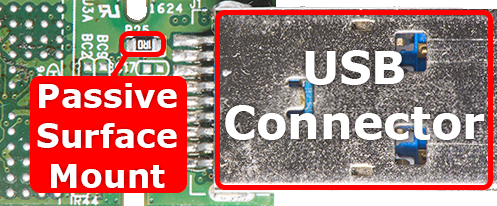
Leaving a flash drive plugged constantly in may cause premature failure of the surface mounts which regulate voltage to the flash drive’s components. Often the resistance or capacitance values of a surface mount will fall out of spec and not produce the correct voltage. This often represents itself as a dead flash drive (no led, not acknowledge by the computer) or overheating.

Data Recovery

YOUR DATA IS RECOVERABLE, the NAND memory chip must be removed and read with an external reader, then the lookup table is reconstructed to retrieve your data. There are NO software programs that can repair logical damage to the lookup tables. Only a data recovery professional specializing in USB flash drive recovery is capable of doing this. USB Flash Drive Data Recovery firms often charge between $450 and $3000 to retrieve data from flash drives, we have the same tools and charge a fraction of the price, visit our USB Flash Drive Recovery page for more information.

Awesome DIY flash drive repair tutorial. I personally won't be opening that Pandora's Box anytime soon, but good to know.

Excellent steps...fabolous idea, looking forward for more information.... Keep moving with...Congrats!!!

Excellent steps...fabolous idea, looking forward for more information.... Keep moving with...Congrats!!!

what wrong with my cam?

my cam's usb failed before; the computer couldn't recognize it. and then after some time, i tried connecting it again, and it worked; i could transfer files to the computer (from the cam) again. and then! after some time, it failed (me) again; the computer couldn't recognize it AGAIN. what's wrong? i'm not very familiar with these things so forgive me if i come across as if i was asking a fortune teller :D thanks for reading my comment though

When I plugged in my USB flash drive, the computer didn't read it, I seek for some answer and majority of them told me that my USB flash drive was dirty. They thought me of a way to clean it but I refuse to because I am afraid that something worst will happen.

I just want to ask if what is the sensitive part of the USB flash drive and what is the best tool to use to clean it. Thank you!

USB flash drives don't fail because their dirty, cleaning it won't do any good.

I experianced the failed flash on a 16GB Centon USB. It was plugged in an working, the program I had opened errored out trying to access files on the USB and next thing I know the drive was dead.

Can you recommend a solid flash drive og 8 to 16GB that is built for every day use. I use my flash about 6 direct hours a day with heavy read/write activity. I use multiple computers an need data and programs available with me all day long.

Thanks

Flash drives are great for reading from but not writing to. Each time your write to the drive it damages the sector. I can't really recommend a good drive because flash drive companies don't manufacture the internal components, they're all third party. Drives 8GB and over tend to be less reliable, especially if they use Micron / Intel memory which tends to fail at a high rate.

The best advice I can offer is look for a flash drive w/ SLC memory. SLC memory tends to be more reliable. The majority of flash drives use MLC memory which is unrelaiable and cheap.

It is very apparant that i have a usb that is hacked as you say. i just got it today from ebay and it took 15 days to get from japan. and i wrote some data to it but though it says 32 GB it stops writing files without any notifications after a certain point. all it had was a sticker saying 32 gb, and its in a very aftermarket like casing. Im gonna email them and see if i can get my money back.. anybody think they can help putting these guys outta buisness. i hate to see americans getting ripped off with out in ramifications.

Congrats , very good post.

hi i am lorrie from california .....
I gather more information from this article.....
Your website is really informative for me........
I enjoyed reading this article..
As i am a computer engineering student this information is very useful to me.....
I share this with my friends....
________
lorrie

Need your Data Recovered?


1. Fill out the Data Recovery Form

2. Mail the drive and form in a padded envelope or small box to:


ATTN: Data Recovery
A+ Perfect Computers
2465 Black Rock Tpke
Fairfield CT, 06825

Click to verify BBB accreditation and to see a BBB report.

Testimonials

Cindy - I can't tell you how much I thank you for your help with this.